Shinji Kanai Notes & Research · CISSP
Cognitive tools  ·  secure by design

Tools for clearer thinking in AI-assisted work.

This is my working lab. I build real tools, use them in daily professional work, and record what changes in a public knowledge graph. AIBO, CognitiveOS, and the Guide Mode agent are shipping software; the graph is the ongoing research behind them. Each tool is a thinking aid first — not a replacement for human judgment.

Reflection Workflow redesign Decision support Secure cognition

A working collection of tools I actually use.

These are not mockups. Each one was built to solve a real friction in AI-assisted work — writing, preparing for hard conversations, reasoning over live speech, or keeping track of what I'm learning — and each one feeds observations back into the research graph.

AIBO interface preview
Active toolAIBO

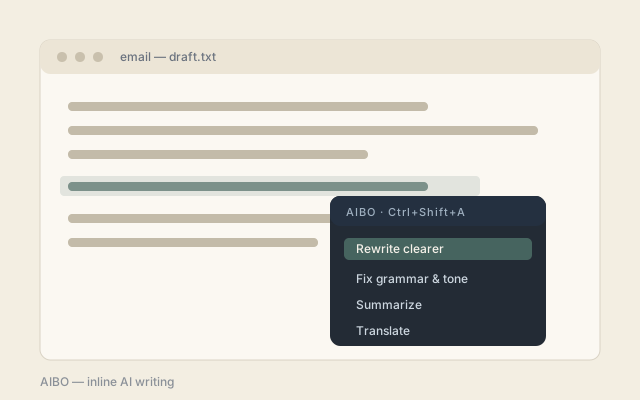
AIBO — inline AI writing

A Windows tray tool that rewrites, fixes, summarizes, or translates selected text almost anywhere via a hotkey — bringing AI to where the text already is instead of a separate chat window.

  • Floating action menu with a diff-style preview before applying
  • Optional PII masking before any text leaves the machine
  • Works with Claude, OpenAI, or local OpenAI-compatible models
CognitiveOS interface preview
In developmentCognitiveOS

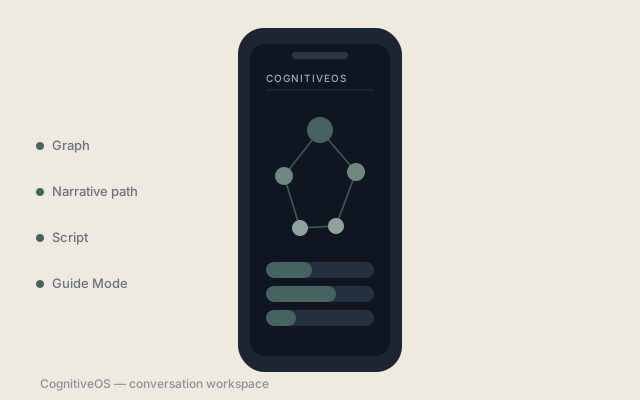
CognitiveOS — conversation workspace

A graph-centered mobile workspace for preparing, rehearsing, and supporting high-stakes conversations. A project starts as a thinking graph, becomes a narrative path, and can generate scripts or live guidance.

  • Graph editor, narrative path, and script composer in one flow
  • Guide Mode adds live, transcript-aware assistance while you speak
  • API keys stored in OS-backed secure storage, not in files
Guide Mode Agent interface preview
Backend serviceGuide API

Guide Mode Agent

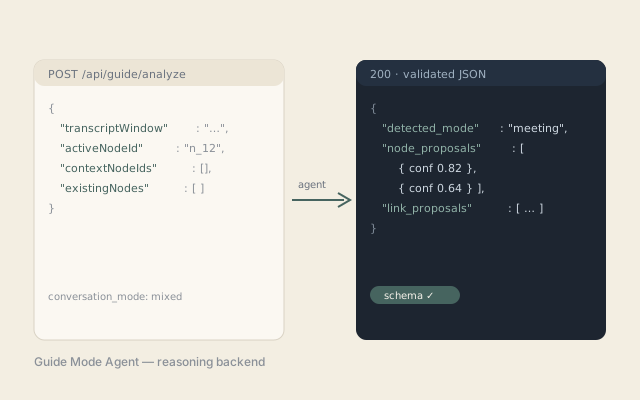
A Vercel-hosted agent service behind CognitiveOS Guide Mode. It keeps agent instructions, output schema, and API keys off the device, and returns validated graph updates from a live transcript window.

  • Detects conversation mode — casual, serious, brainstorming, meeting
  • Returns structured node and link proposals with confidence scores
  • Schema-validated contract to catch drift between app and backend
Guide Mode interface preview
Signature featureLive

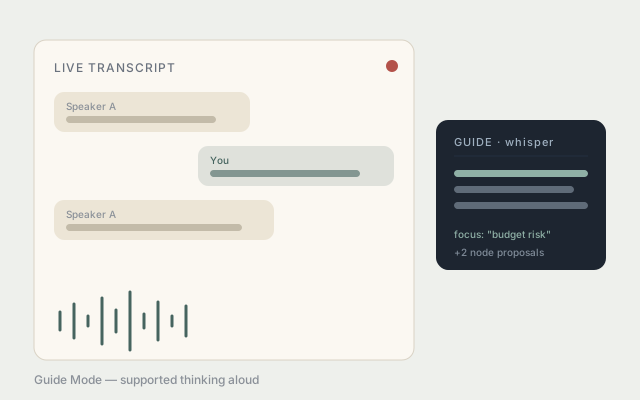
Guide Mode — supported thinking aloud

Inside CognitiveOS, Guide Mode listens to a live conversation and quietly keeps you oriented — focusing existing graph nodes, suggesting what to say next, and proposing new nodes from what was just said.

  • Diarized transcript capture with speaker reference
  • Realtime handoff so guidance and audio never fight for the mic
  • Conversation Bridge mode for structured, branching dialogue
Visual Thinking Graph preview
Live researchGraph

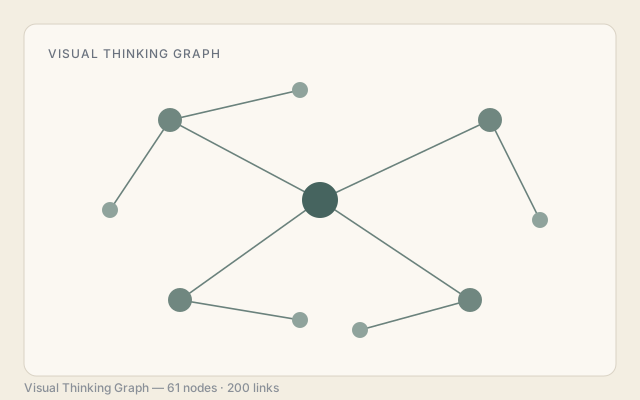
Visual Thinking Graph

A public knowledge graph of the research itself — 51 concept nodes and 160 relationships across thinking, workflow, decisions, psychology, and the future of work, explorable directly in the browser.

  • Links questions, observations, and conclusions as one map
  • Six question-graphs track the open research threads
  • Acts as the site's living thinking record
Knowledge Merge Workflow preview
WorkflowMerge

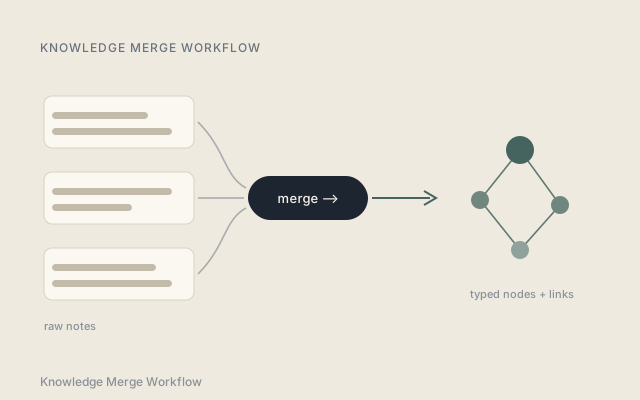
Knowledge Merge Workflow

The routine that keeps the graph alive: new notes and observations are merged into the knowledge graph through a structured Claude workflow, turning scattered daily AI use into a connected, revisable record.

  • Turns raw notes into typed nodes and relationships
  • Preserves evidence counts and update history per node
  • Makes the growth of understanding inspectable over time

How each tool is evaluated.

The collection is intentionally practical. Tools are judged by whether they improve the quality of thinking, reduce unnecessary friction, and preserve accountability when AI enters the workflow.

01

Clarify the cognitive task

Define the thinking job first: briefing, deciding, reflecting, synthesizing, or communicating.

02

Expose assumptions

Make inputs, uncertainties, constraints, and interpretive leaps visible before action is taken.

03

Keep judgment human

Use AI to organize and challenge thinking while keeping ownership with the person using the tool.

04

Review for trust

Check privacy, security, traceability, and whether the output can be explained in plain language.

What the tools are teaching me.

Building and using these tools is the method, not the point. The point is a long-running, self-directed inquiry into what actually changes when AI is deeply integrated into daily thinking and work. These are the questions I'm holding open — and the conclusions I'm arriving at so far.

Q01Cognition

Thinking with AI

The feeling of having thought deeply is not proof that you did. AI can produce the shape of insight without the process that makes it stick.

  • Noticing where reasoning has been outsourced is the first step to doing it on purpose.
Q02Originality

The value of the blank page

The blank page was uncomfortable — but that discomfort was where original thinking happened. Removing it removes something worth preserving.

  • Tolerating uncertainty may become the most valuable cognitive skill in an AI-accelerated world.
Q03Understanding

Understanding vs. explanation

Receiving an explanation is not the same as building a model. Real understanding requires integrating new information with everything you already know.

  • When explanations are free and instant, the rare thing is understanding something well enough to use it without AI.
Q04Judgment

Framing over generation

As generation becomes cheap, the bottleneck shifts to framing. How you define a problem sets the ceiling of any AI-assisted work.

  • Judgment — knowing which output is good, misleading, or worth pursuing — is the skill AI cannot automate.
Q05Depth

Speed, depth, and quality

Speed and depth are not the same. AI makes execution faster while depth of thinking still requires deliberate human judgment to protect.

  • The time AI gives back must be redirected through workflow design, layered refinement, and validation.
Q06Ambition

What becomes worth attempting

The ceiling of individual potential is rising. The constraint is no longer time or access — it is clarity of intent, quality of judgment, and willingness to attempt something meaningful.

  • AI changes what one person thinks is worth attempting — and that shift in ambition may matter more than any productivity gain.

Security and accountability are part of the tool design, not a final review step.

Minimum necessary context Tools should ask for only the information needed for the cognitive task and avoid collecting sensitive context by default.
Traceable reasoning Outputs should make sources, assumptions, uncertainty, and recommended next steps easy to inspect.
Human accountability The tools are designed to support reflection and decision quality without hiding who is responsible for the final choice.

Explore the research map behind the tools.

Open the graph

Interested in careful, secure cognitive tools for AI-assisted work? Start a conversation.

Author
Shinji Kanai
CISSP · writing in the open
Based in
Sydney, Australia
Working globally
Elsewhere